Free Resume Builder: Make a Resume in Your Browser
Letter and CV is a free resume builder for US-style resumes. You type your details into a short form, the page shows a live preview on US Letter paper, and one click downloads a PDF made of real, selectable text. There is no account, no trial and no watermark, and your resume is saved only in the browser you are using.
- No sign-up or email needed
- US Letter PDF with selectable text
- Resume text stays on your device
How the resume builder works
Everything happens on one screen. The form sits on the left, the finished page on the right, and both update together.
Fill in a guided form
Contact details, a short summary, work experience, education and skills come first. Add projects, certifications, languages, volunteering or a section of your own whenever you need them.
Pick one of three free templates
Clean, Harvard and Compact are all one-column layouts with standard headings. Switching keeps every word you typed, so you can compare them in seconds.
Run the ATS basics check
A score from 0 to 100 points out missing contact details, unusual headings, gaps in dates and weak bullet points, with a suggested fix for each one.
Download a text-based PDF
The PDF is drawn in your browser with embedded fonts, so names with accents print correctly and every word can be selected and copied. A .txt copy and a print option are there too.
See what the PDF looks like
This is a real render of the example resume (the person and employers are fictional) in the Clean template, produced by the same layout engine that creates your download. Open it in the editor, replace the details with yours, and you keep the structure.
Open this example in the editorWhat a US resume needs, and what this builder gives you
In the United States and Canada the document you send with a job application is called a resume, and it tends to be short and focused on results. The UK careers service Prospects puts it simply: "In other countries, such as the USA and Canada, CVs are known as résumés." That is why this page opens the editor in Resume mode: US Letter paper (8.5 by 11 inches), no photo field, and section headings that recruiters in the US expect to see.
Leaving the photo out is not a design whim. Harvard's career office lists "Include a picture" and "Include age or gender" under the things not to do on a resume, so the builder simply does not ask for them in Resume mode. If you apply to a country where a photo is common, switch to CV mode, which uses A4 paper and allows an optional photo that never leaves your device. The CV maker page explains that format in detail.
Out of the box you get the five sections almost every resume uses: summary, work experience, education, skills and, if you have them, certifications. Each section can be renamed, moved up or down with the arrow buttons (they work from the keyboard too), collapsed while you work on something else, or removed. Experience entries take a job title, employer, location, start and end month, and one achievement per line.
Is it really a free resume builder?
Yes. The free plan is not a time-limited trial and it does not switch into a subscription. You can build as many resumes as you like, use all three free templates, run the ATS basics check, and download PDF and .txt files without a watermark. You do not need to give an email address at any point, because there is no account to create.
If you want more designs later, there is a Premium Pass that costs US$9 once, paid through a WhatsApp chat, with no subscription and no trial. It adds premium templates. Nothing in the free resume maker is locked behind it, and you never need it to download your file. See the pricing page for exactly what it includes.
Your resume stays in your browser
Most online tools ask you to sign up so they can store your resume on their servers. This one works the other way around. Every keystroke is saved in your browser's own storage (IndexedDB, or local storage if IndexedDB is unavailable), and the PDF is generated on your device. The words you type are not sent to our server, which also means the builder keeps working if your connection drops halfway through.
Because the data lives in one browser, the editor gives you three tools to stay in control:
- Download backup. Saves every document as a small .json file and records the date, so you always know when you last made a copy.
- Restore from backup. Loads that file on another computer or after clearing your browser.
- Delete all data. Removes every resume the builder saved in this browser in one step.
Browsers can clear stored data on their own, for example when the disk is full, or Safari after seven days without a visit to the site. The editor warns you when the browser has not promised to keep the data, and if storage is ever full it tells you straight away instead of silently losing your last change. If you open the same resume in two tabs, it warns you so the tabs do not overwrite each other.
Built to be read by applicant tracking systems
Many employers collect applications through an applicant tracking system (ATS) that reads the text of your file. The documentation of one widely used ATS, Greenhouse, names the usual reasons a resume fails to parse: "Resumes that include graphics, photos, or word art", "Complex resumes with tables, headers, and footers", and resumes uploaded as an image rather than a document. Its candidate FAQ adds: "Upload a PDF for best results."
Every free template avoids those problems by design. Text flows in one column, in the same order you see it. Headings use plain words such as Work Experience and Education. There are no tables, no text boxes, no icons standing in for words, and nothing in the page header or footer. Fonts are embedded in the file, so the text extracts correctly even on a computer that does not have them installed.
We test that claim instead of only stating it. Each template is exported in an automated test, the text is pulled back out of the PDF, and the test fails if a single string is missing, out of order or garbled, including accented names and text such as <script> that must appear as plain words. The full procedure is on the ATS test method page. To be clear about the limits: no tool can promise that every ATS will rank your resume well, so we describe the output as ATS-friendly, not as a guaranteed pass.
Three free templates, one click apart
Switch the template in the editor at any time. Your text stays where it is, only the design changes.
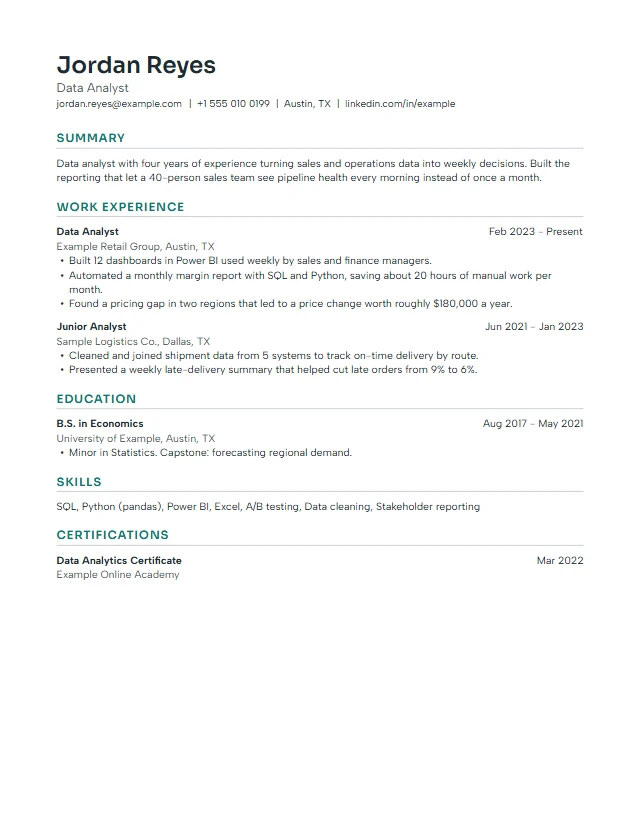 Clean
Clean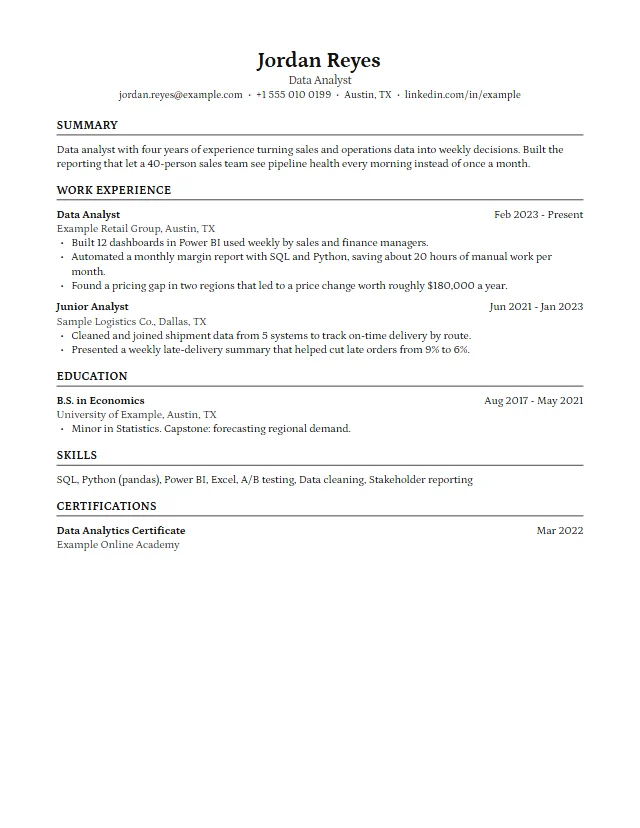 Harvard
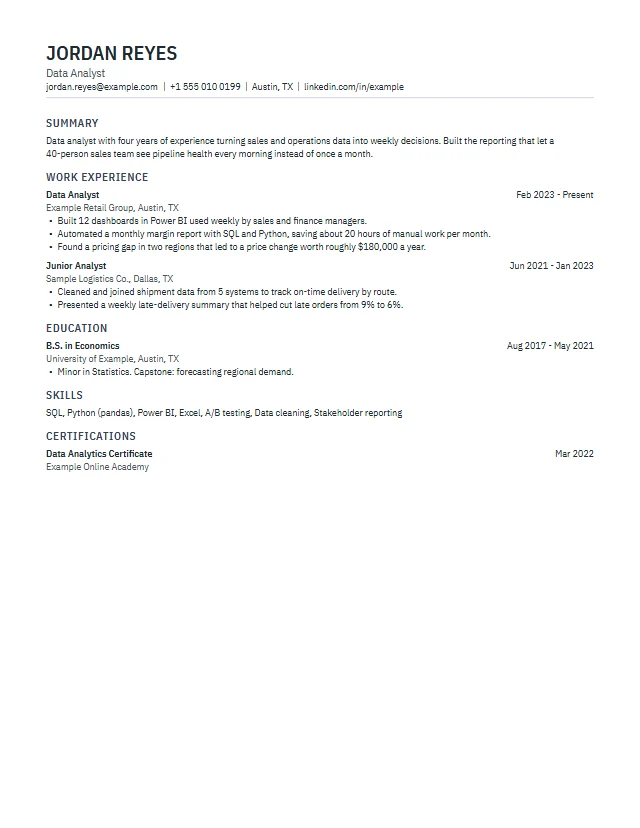 Compact
Writing tips the builder nudges you toward
A good layout only gets your resume read. What makes it work is the content, and the editor helps in small, practical ways while you type.
- Use the exact job title from the ad in the headline field. Tracking systems and recruiters both match words, not intentions.
- Write achievements, not duties. Start each bullet with a verb and add a number where you honestly can: how many, how much, how fast. The ATS check flags bullets that start with phrases like "Responsible for".
- Use bullet suggestions as a starting point. Type a job title and the editor offers example bullet points from a built-in library for common roles. Text in [brackets] is a placeholder, and the check reminds you if one is left in.
- Keep dates consistent. Pick a date format once (Oct 2026, October 2026, 10/2026 or year only) and every entry follows it. Short month and year is the least ambiguous choice for readers in different countries.
- Stop at one or two pages. The preview shows the page count as you write, and the length rule warns you when a resume runs past two pages.
For a longer walk-through, read how to write a resume and the guide to an ATS-friendly resume.
Tailor it to a job ad in a few minutes
Paste a job description into the ATS check and the editor compares the most frequent terms in the ad with the words in your resume, listing the ones you have not used yet. It runs entirely in your browser, so the ad is not uploaded either. Add the terms that are genuinely true for you, then duplicate the document so you keep one version per application without retyping anything.
When the resume is ready, open the cover letter generator to write a matching letter, or browse resume examples and resume templates for more ideas.
Works on a laptop or a phone
On a wide screen you see the form and the page side by side. On a phone the form comes first, and a button at the top switches to the preview, so you can build resume online free of any app install, check the result and download it from the same screen. The fields have proper labels and every control works with the keyboard, which also helps if you use a screen reader.
Create your resume now
Open the editor, type your details and download the PDF when you are happy with it. It usually takes one sitting.
Open the resume builderResume builder questions
Do I need to create an account?
No. There is no sign-up and no email field. The resume is saved in your browser, and you can download a backup file whenever you want a copy.
Is the PDF download really free and without a watermark?
Yes. All three free templates download as PDF or .txt without a watermark and without a limit on the number of downloads.
Will my resume pass an ATS?
The templates are built to be ATS-friendly: one column, standard headings, real text and embedded fonts, checked by an automated extraction test. Each tracking system reads files a little differently, so no builder can guarantee a pass, but these files avoid the parsing problems ATS vendors document.
What is the difference between Resume mode and CV mode?
Resume mode follows US conventions: US Letter paper and no photo. CV mode follows UK, European and Asian conventions: A4 paper and an optional photo. You can switch at any time and keep your content.
Can I use the resume builder offline?
Once the editor has loaded, you can keep typing and exporting without a connection, because saving and PDF creation happen in your browser.
How do I move my resume to another computer?
Click Download backup to save a .json file, then use Restore from backup in the editor on the other computer.
Can I write my resume in another language?
Yes. Set the document language to English or Bahasa Indonesia, and the section headings and month names follow it. Names with accents, such as José or Zoë, print correctly in the PDF.