
How We Test Our PDFs for ATS Readability
Short answer: every free template is exported by an automated test, the text is extracted back out of the PDF with two independent tools, and the test fails if any word is missing, garbled or out of order. That proves the file is machine-readable text in reading order. It does not prove how a particular employer's applicant tracking system will score you, and we never claim it does.
- Part of the release test suite
- Two extractors: pdf.js and pdftotext
- Accents and HTML-like text included
What the test checks
Each check turns a common parsing problem into a pass or fail rule.
Every string comes back
Name, headline, contact details, employers, dates and skills are read back from the PDF. One missing string fails the test.
Sections stay in order
The extracted text must list the headings in the same order the user arranged them, including a custom section moved between two standard ones.
Accented names survive
The test name is José Ñúñez-Müller Çelik Wąsik Şahin, which covers Spanish, German, French, Polish and Turkish letters.
Code-like text stays text
A headline containing <script>alert("x")</script> must come back as those exact characters, proving input is printed, never executed or dropped.
Why a PDF can look fine and still fail
A PDF is a set of drawing instructions. Two files can look identical on screen while one contains real characters and the other contains shapes, an image, or glyphs with no mapping back to letters. A human reader cannot tell the difference; a parser can. That is the gap this test closes.
ATS vendors describe the same failure points. Greenhouse's help article on unsuccessful resume parsing lists "Resumes that include graphics, photos, or word art", "Complex resumes with tables, headers, and footers", resumes uploaded "as an image, rather than a document", files larger than 2.5 MB, and "A resume with spaces between the letters." Its candidate FAQ recommends: "Upload a PDF for best results." Our templates are designed around that list, and the test checks the parts of it that can be measured automatically.
The procedure, step by step
- Build a test document. We start from the fictional example resume and add hard cases: the accented name above, a headline with <script> in it, a skill written as "C++ & <b>HTML</b>", a current job (so the date reads "Present"), and links for email and a profile URL.
- Export with the real engine. The test calls the same layout and PDF code the editor uses in your browser (pdf-lib with fontkit), once for each free template: Clean, Harvard and Compact.
- Extract with pdf.js. Mozilla's PDF reader library pulls the text from every page. We compare it with the input, string by string.
- Extract again with pdftotext. A second, unrelated extractor from the Xpdf tools reads the same file, so a quirk in one library cannot hide a problem.
- Check section order. The positions of Summary, Work Experience, Education, Skills and Certifications in the extracted text must be strictly increasing.
- Inspect the file structure. Each embedded font must be present (a FontFile2 entry) with a ToUnicode map, which is what lets any reader turn glyphs back into letters. Links must be real URI annotations. Resume mode must contain no image objects at all.
- Check size and pages. A two-page resume must stay under 500 KB, well below the 2.5 MB parsing limit Greenhouse documents, and text must continue correctly onto page two.
These checks are part of the project's automated test suite, which has to pass before a release, and they run again whenever a template or the layout engine changes.
Design rules that make the test pass
- One column. Text is placed in a single reading order, top to bottom, so extraction order equals visual order.
- Standard headings. Defaults such as Work Experience, Education and Skills are words tracking systems commonly map to fields. The ATS basics check in the editor warns when you rename a section to something unusual.
- No tables, text boxes or icons in place of words. Dates sit on the same line as the job title as plain text, not in a separate column.
- Nothing in page headers or footers. Your name and contact details are part of the body text on page one.
- Embedded, open-licence fonts. Albert Sans, Sora, Petrona and IBM Plex Sans Condensed are embedded as subsets, so the file renders and extracts the same on any computer.
- Ligatures off. Letter pairs such as "fi" are kept as separate characters, so a word like "office" is never stored as a special combined glyph.
Three free templates, one click apart
Switch the template in the editor at any time. Your text stays where it is, only the design changes.
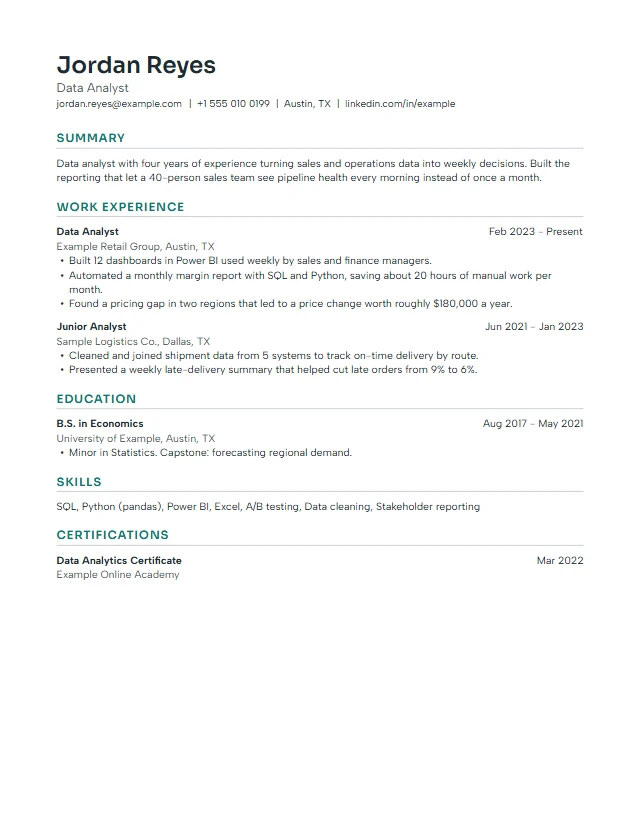 Clean
Clean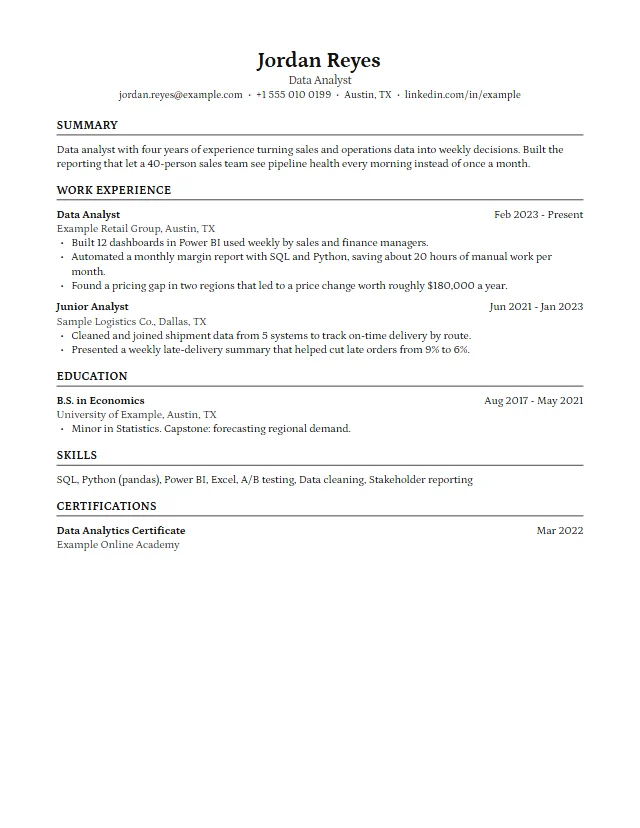 Harvard
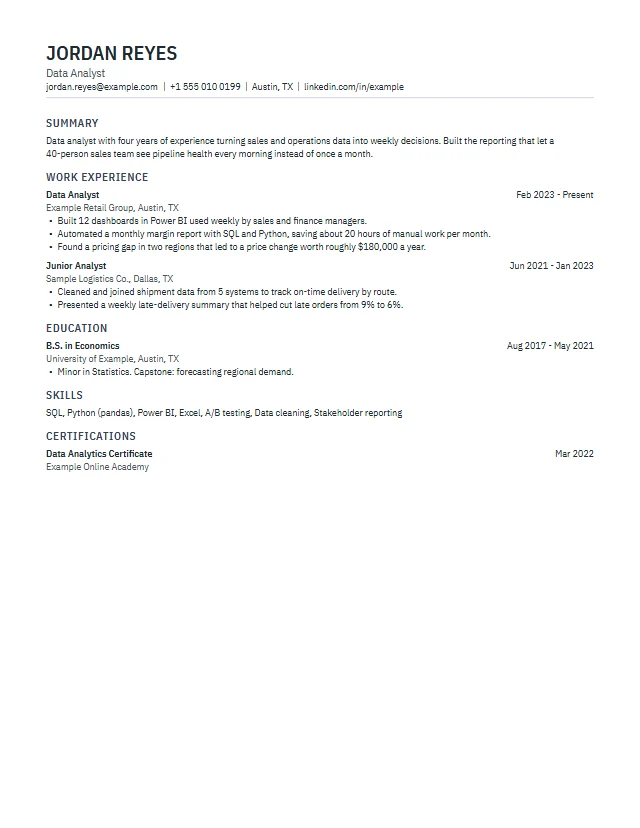 Compact
What this test does not prove
We want to be precise here, because "ATS-proof" claims are common and rarely backed up.
- We do not run commercial ATS software. We have not uploaded test files into Workday, Greenhouse, Lever, iCIMS or any other vendor's product, and we do not have access to how they rank candidates.
- Readable is not the same as shortlisted. Ranking depends on the employer's settings, the job, and your content. A perfectly parsed resume can still be a weak match.
- Your edits matter. If you rename every heading or paste text full of unusual symbols, the file is still text, but a parser may map it less reliably. The editor's ATS basics check flags the common cases.
- Browsers differ slightly. The PDF is generated in your browser. Our automated tests run in Node.js and Chromium-based browsers; other browsers use the same code path, but we record them honestly as tested by emulation where we have no physical device.
That is why the product copy says ATS-friendly and never "guaranteed to pass".
Check your own PDF in two minutes
You do not need special software to repeat the core of our test on your own file, whichever tool made it:
- Open the PDF in a browser or PDF reader and press Ctrl+A (Cmd+A on a Mac), then copy.
- Paste into a plain text editor such as Notepad or TextEdit.
- Read it top to bottom. Your name, contact details, every heading, every job and every date should be there, in order, with accents intact and no words split into single letters.
- Search the PDF (Ctrl+F) for your email address. If the search finds nothing, the address is probably part of an image.
If something is missing in the pasted text, a tracking system is likely to miss it too. You can also export a .txt copy from our editor to see exactly what text the PDF contains.
How the ATS basics check in the editor relates to this test
This page is about the file format, which we control. The ATS basics check in the editor is about your content, which you control. It gives a score from 0 to 100 based on contact details, standard headings, complete and consistent dates, length, bullet quality, optional keyword match with a pasted job ad, and whether every character can be drawn by the embedded fonts. It runs in your browser and nothing you type is uploaded. Learn more about content on the ATS-friendly resume guide, or start in the resume builder or CV maker.
Questions about our ATS testing
Does a Letter and CV resume pass every ATS?
No tool can promise that. Our test proves the PDF contains complete, ordered, extractable text with embedded fonts, which avoids the parsing problems ATS vendors document. How a specific system ranks you depends on the employer and your content.
Which tools do you use to extract the text?
pdf.js (Mozilla) and pdftotext from the Xpdf tools. Both must return every test string.
Are premium templates tested the same way?
Yes. Premium templates use the same template format and layout engine and must pass the same extraction test before they are offered.
Why do you test names with accents?
Because a font without the right glyphs, or a PDF without a Unicode map, can turn é or ş into blanks or wrong letters. That would break your name in every system that reads the file.
Can I see what text my PDF contains?
Yes. Download the .txt version from the editor, or copy all text from the PDF and paste it into a plain text editor.