Free CV Maker for A4, ATS-Friendly CVs
This CV maker builds a curriculum vitae on A4 paper in your browser: you complete a form, check the page as it fills in, then save a PDF whose text can be selected, searched and parsed. It is free, there is no login, and the CV is stored on your own device rather than on our servers.
- A4 by default, US Letter on request
- Optional photo, kept on your device
- English or Indonesian headings
Design a CV in four moves
No blank document, no formatting fights with a word processor. The structure is ready; you bring the content.
Choose CV mode
The editor opens with A4 paper, a Profile section at the top and a photo field you can use or ignore. Change the paper to US Letter if an employer asks for it.
Add your history
Enter roles and studies with month and year. Mark a current job with one tick and the CV prints "Present" in the right language.
Arrange the sections
Move Education above Experience for a graduate CV, add Languages or Volunteering, or create a custom heading such as Publications.
Check, then save the PDF
The built-in check scores contact details, headings, dates, length and bullet points out of 100 before you save the A4 PDF.
An example CV, rendered by the CV maker
Below is the example CV (Zoë Martínez is a fictional person) in the Harvard template on A4. The accented name is there on purpose: it shows the embedded fonts printing ë and í correctly, which matters for real names across Europe and Latin America.
Edit this CV in the editorCV or resume: which one are you writing?
The words are used differently depending on where you apply. In the UK and many other countries the job application document is called a CV. The UK careers service Prospects explains that "In other countries, such as the USA and Canada, CVs are known as résumés", and that these "tend to be more concise".
For most job seekers outside North America the practical difference comes down to three things this tool handles for you:
- Paper size. The Unicode CLDR locale data, which browsers and operating systems use, sets A4 as the default for the world and US Letter only for a short list of countries: the US, Canada, Mexico, the Philippines and a few in Central and South America. CV mode therefore starts on A4.
- The opening section. A UK-style CV usually begins with a short personal profile. In CV mode the first section is called Profile instead of Summary.
- Dates. British and international English write dates day first, as in 25 October 2026, while US English writes October 25, 2026. Month and year alone, such as Oct 2026, reads the same way everywhere, so that is the default.
If you need the North American version, the resume builder opens the same editor with US Letter and no photo, and you can switch any document between the two modes without losing text.
What to put on a UK or European CV, and what to leave off
Official UK careers advice is clear about personal details. The National Careers Service says: "You should not include your age, your date of birth, whether you're married or your nationality." The Northern Ireland government site nidirect adds that you do not need your date of birth, age or salary, and suggests you "aim for no more than two pages". So the CV maker has no fields for birth date, marital status or nationality, and the length check warns you if the CV grows past the point most readers expect.
On references, the National Careers Service advises that "you should not put someone else's contact details on your CV"; you can write that references are available on request instead. If you want that line, add a custom section and type it there.
The same service lists the core sections as contact details, an introduction, education history and work history. Those map directly onto the standard sections of the editor, and each one uses a plain heading that applicant tracking systems recognise.
Should a CV have a photo?
It depends on the country and the employer. For the UK, careers advisers quoted by Prospects say that unless you are applying for an acting or modelling job you do not need a photograph. Conventions differ by country and by employer, and some job ads ask for a photo.
That is why the photo is optional and only appears in CV mode. If you add one, the image is cropped to a square and stored in your browser together with the rest of the CV; it is not uploaded. The ATS check reminds you that many tracking systems skip images, so the information that matters, your name and contact details, is always printed as text next to it.
A CV online, but not in the cloud
Most "CV online" services store your career history on their servers and ask you to log in each time. This CV builder free of charge keeps the opposite promise: the editor saves to your browser's storage, the PDF is produced on your device, and none of the fields you fill in are sent over the network. It even keeps working offline once the page has loaded.
The trade-off is that the CV lives in one browser. Use Download backup to keep a copy as a small file, Restore from backup to continue on a different device, and Delete all data when you are using a shared computer. The editor shows the date of your last backup, and it warns you if the browser storage is full or if the same CV is open in a second tab.
Three free templates, one click apart
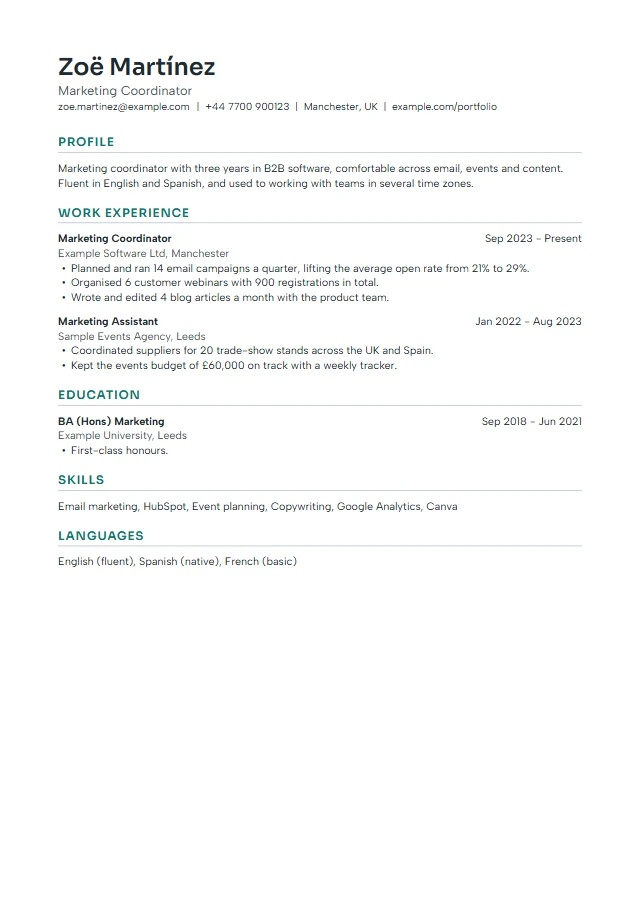
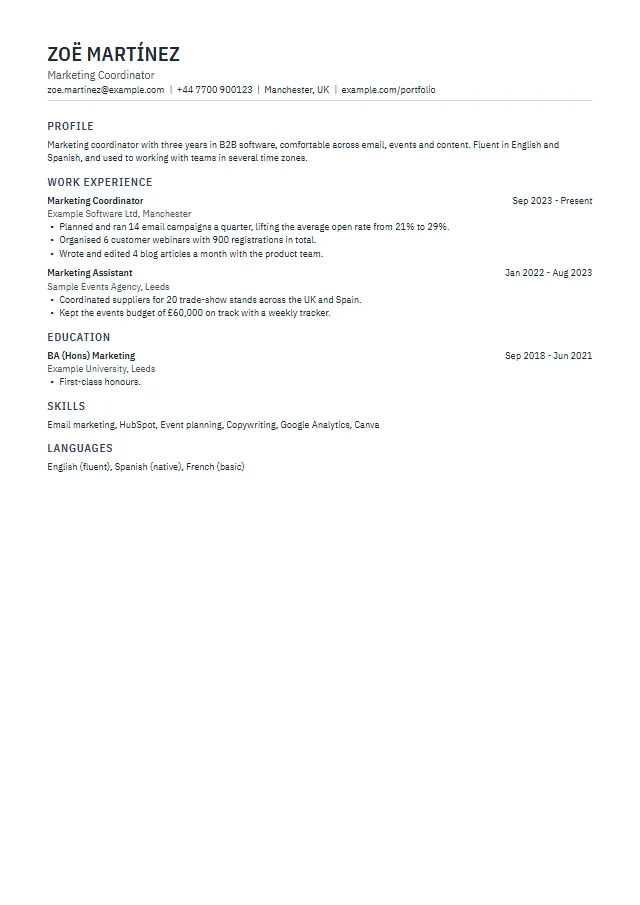
Switch the template in the editor at any time. Your text stays where it is, only the design changes.
 Clean
Clean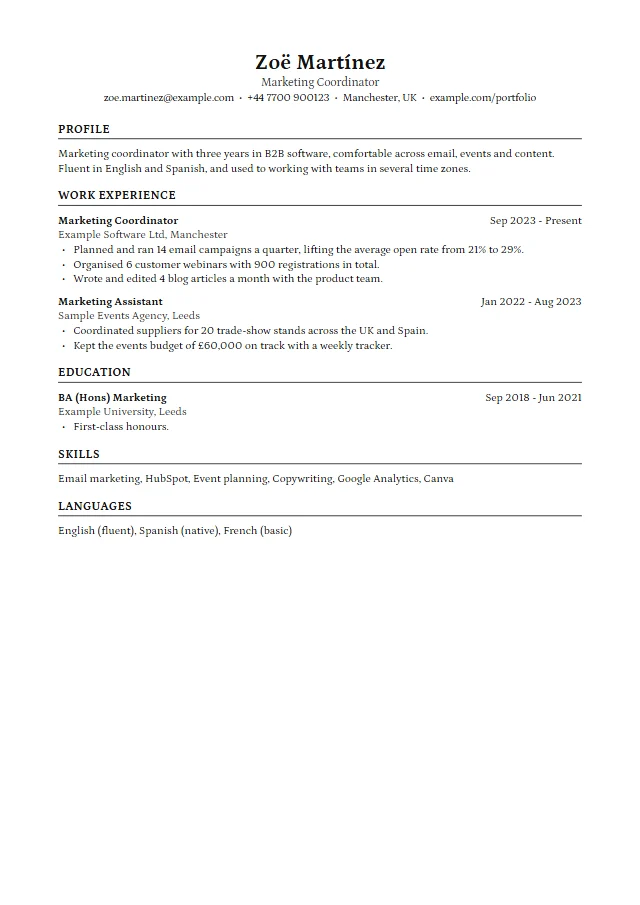 Harvard
 Compact
Applying in the EU? A note on Europass
The European Commission runs Europass, an official CV service that it says is provided "free of any charge and in 31 different languages". It requires you to create a Europass profile first, and it is a good option if an employer or university specifically asks for the Europass format. Letter and CV is not connected to Europass. If no specific format is requested, a clean one-page or two-page CV made here works for most private-sector applications, and you can find the official tool at europass.europa.eu.
How to make a CV on your phone for free
The CV maker works on a phone browser without an app. The form is laid out in a single column with large inputs; a button pinned to the top switches between the form and the A4 preview, and the PDF downloads straight to your phone, ready to attach to an email or upload to a job portal.
- Open the CV editor on your phone.
- Fill in your contact details and profile, then add your jobs and studies.
- Tap the preview button to check the layout and the page count.
- Tap Download PDF. Back up the CV if you plan to continue on a laptop.
Three free CV templates, one column each
Clean uses a modern sans serif with teal headings and suits most roles. Harvard is a traditional serif layout with a centred name and ruled headings, in the style many university career offices use. Compact uses condensed type and tighter spacing when you need more on a page. All three keep a single column with the text in reading order, which is what parsers handle best. Browse more designs on the CV templates page or see finished CV examples by job.
Ready to create your CV online free?
Start with a blank A4 CV or the example, and save the PDF whenever you are done.
Open the CV makerCV maker questions
Is this CV maker free?
Yes. Making, editing and downloading CVs is free, with no watermark and no limit. An optional one-time Premium Pass (US$9, no subscription) only adds extra template designs.
What is the difference between a CV and a resume?
A resume is the short US and Canadian version, usually on US Letter paper and without a photo. A CV is the name used in the UK, Europe and much of Asia, usually on A4. This tool makes both from the same content.
How long should my CV be?
For most jobs in the UK, careers services suggest no more than two A4 pages. The preview shows the page count while you type, and the check warns you when the CV gets long.
Can I add a photo to my CV?
Yes, in CV mode. The photo is optional, stays in your browser and appears at the top right. For UK applications it is usually not expected.
Can I make my CV in English and in Indonesian?
Yes. Set the document language to English or Bahasa Indonesia; the headings and month names change while your content stays. Duplicate the document to keep both versions side by side.
Where is my CV saved?
Only in the browser on your device. Download a backup file to keep a copy or move the CV to another computer.